

Free & Easy Network Diagrams with OpenOffice Draw

Reading Time: 3 minutes
🗺️ Why Create Network Maps?
Creating network maps and diagrams is essential for proper documentation and showcasing professionalism in IT work. I recently worked with a small business whose Windows Small Business Server 2008 was on the fritz. They opted for a new server and additional services.
As someone who values well-organized documentation with clear visuals, I went looking for a free, simple network mapping solution—but most of what I found was either too basic, required subscriptions, or was limited to trial versions. Even Microsoft Office wasn’t ideal, since it’s not a free tool.
🧩 Free & Functional: OpenOffice Draw + Network Extensions
After some searching, I came across a free extension for OpenOffice that works perfectly with OpenOffice Draw to create professional network diagrams. It was exactly what I needed.
The extension CFnaRede Gallery of Network Equipment Shapes – 1.3.0 builds upon the VRT Network Equipment gallery and adds even more variety, giving you access to a wide range of shapes and icons to suit your needs.
🛠️ How to Use the CFnaRede Extension
Here’s how to get started once you’ve installed the extension:
- Open OpenOffice Draw
- Go to View > Sidebar to enable the right-hand sidebar.
- Click the Gallery icon (second from the bottom) or access it from the hamburger menu.
- From there, you can drag and drop icons from the CFnaRede Gallery directly into your drawing canvas.
You’ll be up and running in no time!
📤 Exporting and Sharing Your Diagram
When you’re done, you can print your diagram or export it as a .JPG or .PDF. This makes it easy to share with clients or keep for internal documentation.
⚠️ Tip: Even though the tools are free, your time isn’t. If a client asks for network documentation, consider whether it’s something they should pay extra for—especially if they’re not on a managed services plan.
🧾 Keep It Simple (But Don’t Undervalue Yourself)
This kind of basic diagramming is useful for clients who:
- Don’t pay for Managed IT Services
- Don’t always recognize the behind-the-scenes work we do
IT can be a thankless job. Sometimes, clients move to another provider and pass your work along. Don’t make life easier for a competitor at your own expense. Be selective about when and how you provide this documentation.
💡 I actually got the idea to use OpenOffice Draw from a discussion on r/SysAdmin—a great community for IT professionals. Give it a visit!
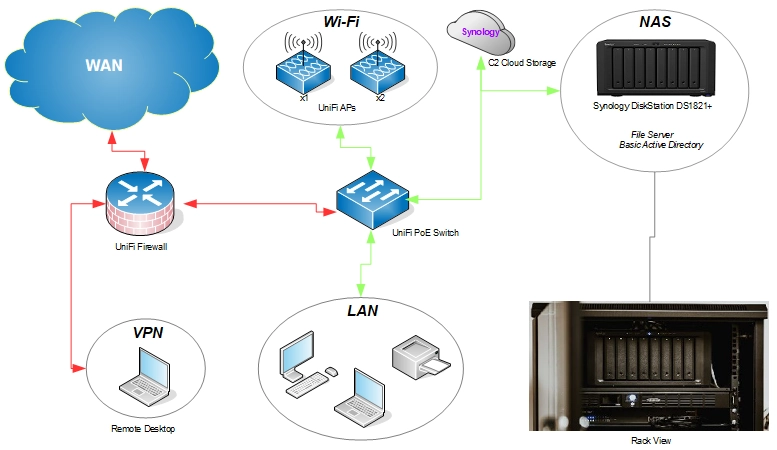
Here’s an example of a diagram I recently created:
⚠️ Tip: Even though the tools are free, your time isn’t. If a client asks for network documentation, consider whether it’s something they should pay extra for—especially if they’re not on a managed services plan.
✅ Conclusion
While this method isn’t perfect, it’s a solid free solution. I could have improved the layout with more space, but it fits neatly on an 8.5 x 11″ sheet—perfect for quick printouts.
Yes, some of these extensions also work with LibreOffice, but I personally prefer OpenOffice for this task. It feels like a small victory not having to pay or subscribe for yet another tool.
So, to those looking to nickel-and-dime IT professionals: better luck next time!!
🌿 Final Thoughts
In a world full of paid tools and subscription traps, finding a free and effective solution like OpenOffice Draw with the CFnaRede extension feels like a win. It may not be as flashy as premium software, but it gets the job done—clean, clear, and professional. Whether you’re documenting for yourself or providing visuals for a client, remember: the value isn’t just in the diagram—it’s in your expertise behind it. Use your time wisely, document smartly, and don’t be afraid to draw the line between free advice and paid service.

My name is Dex, author at WinReflection.
I am a Christian, conservative, problem-solver, and truth-seeker who is not afraid to share about important or controversial issues—silence leads to death. There’s more to life than the worldly status quo, and that’s why many are sad and depressed—they’re suffocating. Truth and purpose can bring fresh air into one’s life, and that’s my mission. For those that care, here is my script/command laboratory.
📖 John 3:16: For God so loved the world that He gave His one and only Son, that whoever believes in Him shall not perish but have eternal life.
Leave a Reply
Want to join the discussion?Feel free to contribute!